









By reading this page, you can learn about the following aspects of data cubes, a key MODLR functionality:
- Introducing Cubes, a Key MODLR Functionality
- Why are Cubes Better Than Tables for Data Storage?
- What are the Benefits of Using Data Cubes in MODLR?
- How Are Cubes Used in MODLR?
- Why Do Cubes Matter to MODLR Users?
- How Do MODLR Cubes Compare with Other Data Storage Alternatives?
- I am a MODLR User. How Can I Create Cubes on MODLR?
Introducing Cubes, a Key MODLR Functionality
Cubes in MODLR are multi-dimensional data structures that can be used to store, organise and analyse business information across dimensions like time, product, and department. (MODLR technical documentation)
Data cubes, a key MODLR functionality, are more customisable than static tables with rows and columns, and empower users to customise, manipulate and query data quickly and at a granular level. They make modelling in budgets, forecasts, and reporting quicker, more versatile and reports more detailed and elegant. You can link cubes to your dashboards and workviews in MODLR for real-time visibility, quick insights and better decision-making. For all these reasons, MODLR has chosen to use cubes instead of tables.
Why are Cubes Better Than Tables for Data Storage?
A cube is a data structure that stores data in a multidimensional form. Compared to tables, with rows and columns, cubes enable us to organise, hold and select data along dimensions and measures
- Cubes are more customisable than tables. They make it easier and faster to slice, dice, and summarise information for planning, budgeting, forecasting, and reporting in a more elegant manner.
- Cubes make it easier to create more detailed reports. Data in cubes are not confined to a single column or row header as with tables. Pivoting data in a table—assuming we are talking about SQL tables—requires technical knowledge. In contrast, the dimensionality of cubes lets you view data in multiple ways with speed and ease. MODLR users are able to create detailed reporting formats, where they can drill into elements at a deeper level or to review items at a higher level.
- Cubes help present data in a more elegant fashion. You can create more polished layouts and reports when using cubes, whereas tables typically offer lists of unfiltered data.
- In the MODLR platform, data cubes act as an online hub. This way the data in cubes can be drawn on and easily accessible to all users via a website link. This flexibility is not available to regular users of tables that do not have SQL querying skills.
MODLR Founder Ben Hill believes that the power of cubes lies in the dimensionality, user friendliness and customisability.
What Does a Cube in MODLR Look Like?
Visualise a data cube as a three dimensional Rubik’s Cube for storing data.
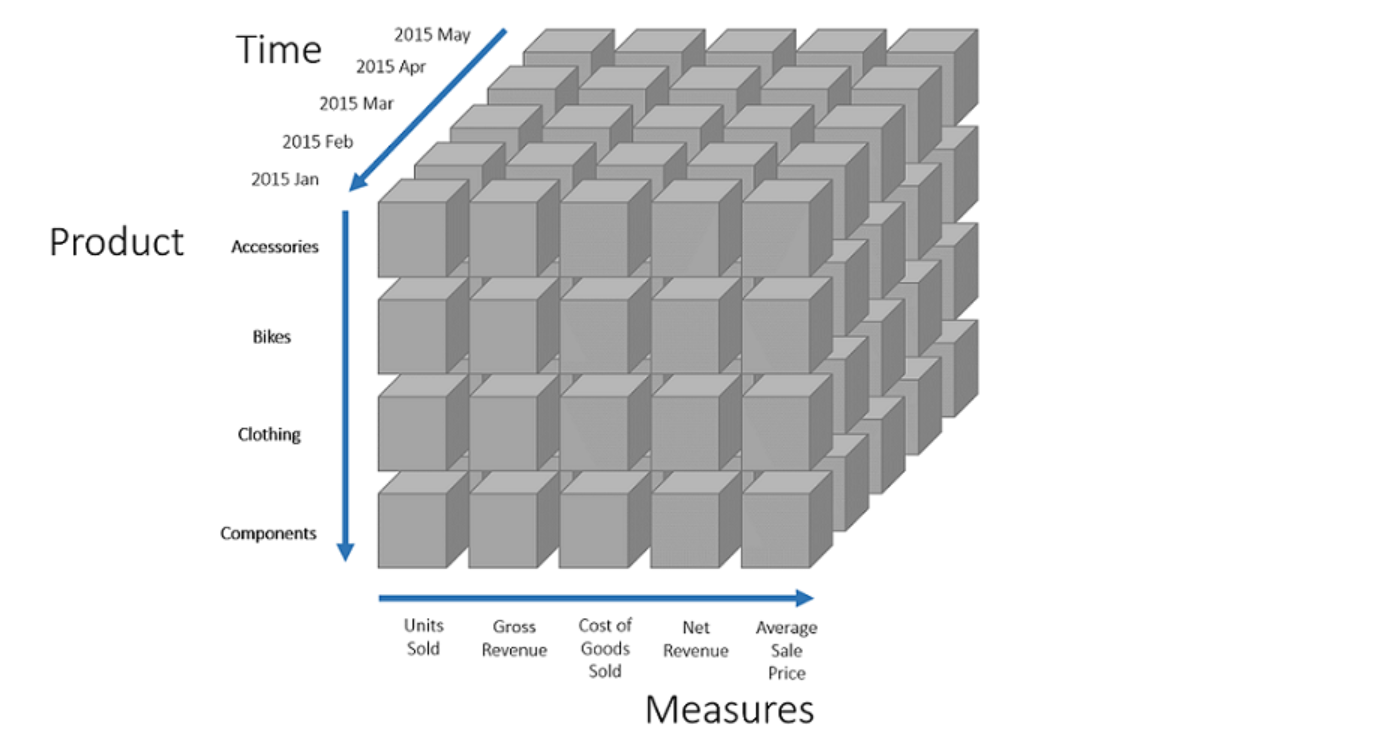
- The 3 Dimensions in a cube are the categories that define how your data can be broken down. Dimensions can be any variable of the data, including geographic location, product, time period or scenario.
- The Measures Dimension is a special dimension that always comes last and defines the numeric metrics stored in the cube (like Revenue, Units Sold, Cost).
- A Cell lies at the intersection point of three dimension elements. In other words, a cell is a specific combination of dimension elements (such as Jan 2026 × Retail Sales × of Product A) and holds the measured values for that intersection.
- Each cell in a cube contains the aggregated data values for a particular combination of dimension elements (one element from each dimension). In other words, each cell contains the aggregated measures, for an element from each dimension of that cube.
Here’s An Illustrated and Simplified Example of a Sales Data Cube
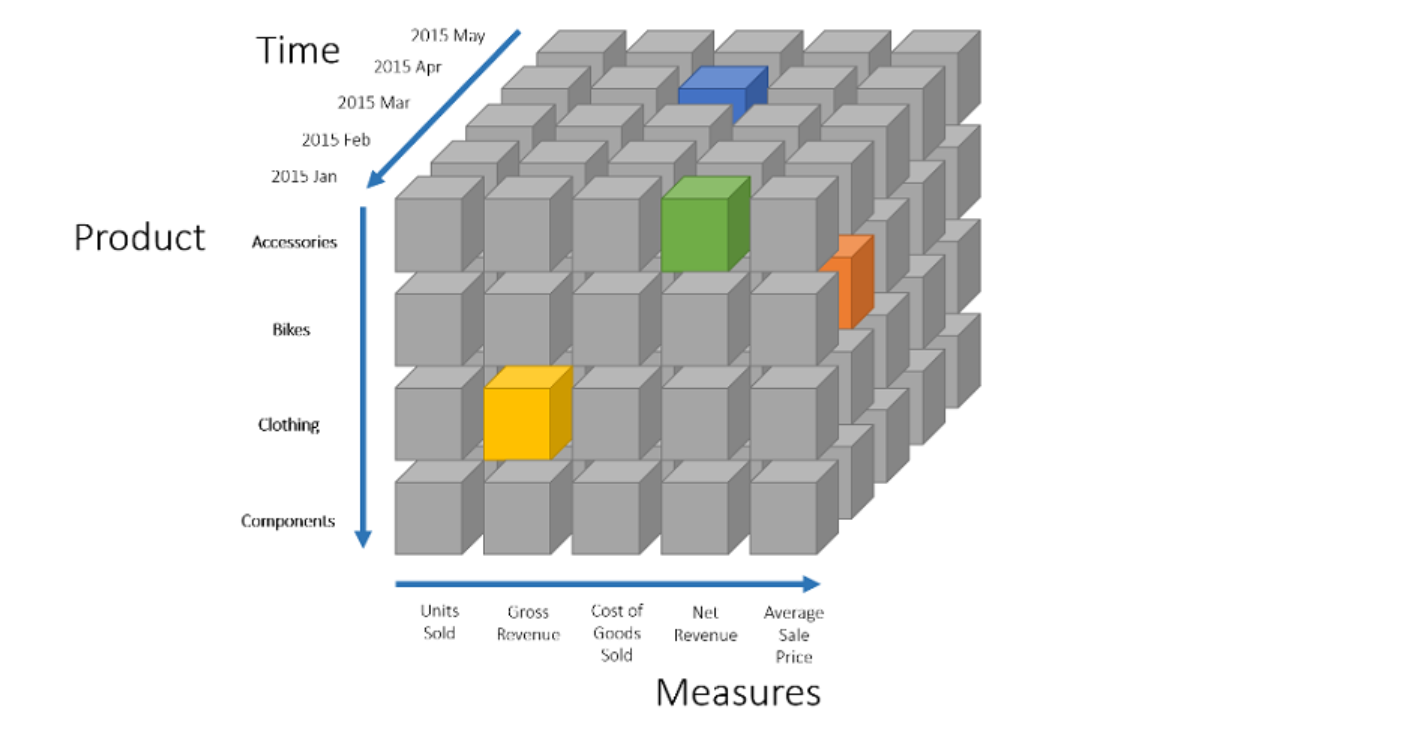
- This cube has Products, Time Period and a ‘Measures’ dimension which holds data for units sold, gross revenue, cost of goods, net revenue and average selling price.
- The cells in this diagram correspond with respective products, time period and the measures such as units sold, gross revenue, cost of goods sold etc.
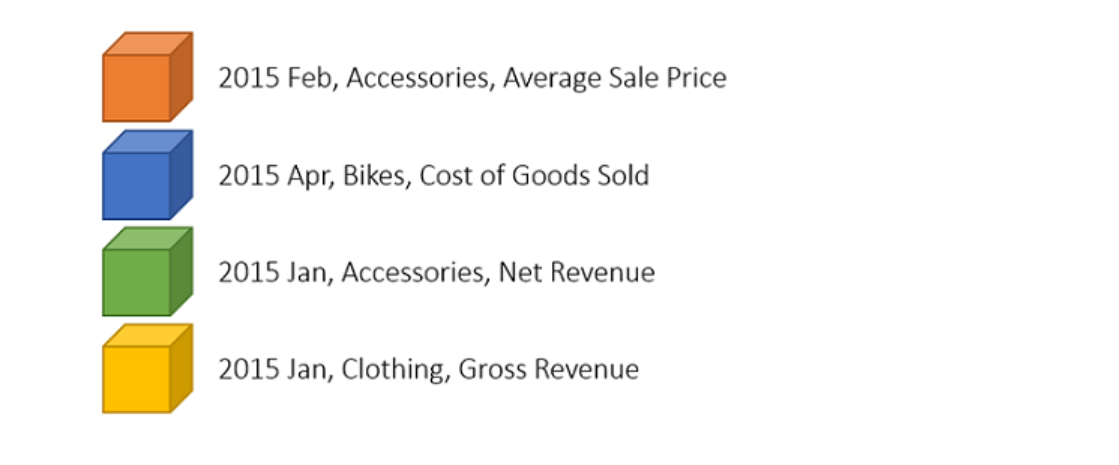
- To elaborate, here’s what you get from each of the coloured cell in this sales data cube:
What are the Benefits of Using Data Cubes in MODLR?
According to Ben Hill, Founder of MODLR, cubes, with their versatility and the ability to store large data volumes, make for quick access and faster processing times.
- Quick access. Because cubes store aggregated data at a summary or non-transactional level, they allow quick access to the data without having to perform summations of transactional data on the fly each time for every query.
- Faster processing. Quick access to data inevitably means faster processing. Your queries can be answered with minimal delays.
- Ideal for storing and analysing large volumes of data. Quick access and , particularly when that data is changing slowly over time.
- Cubes are versatile. You can link cubes with formulas, by letting one cube’s values feed into another. For example you can link a Sales cube to a Profit & Loss cube with ease.
How Are Cubes Used in MODLR?
Cubes form the backbone of reporting in MODLR. This enables MODLR tools like Workviews and Cards to build views or dashboards from cube data with speed.
You can use cubes in multiple ways:
- Workviews present cube data in spreadsheet-like grids for analysis and data entry.
- Cards & Dashboards display data visually or in flexible layouts pulling from one or multiple cubes.
- For automations. Processes can load or update cube data automatically, such as night-time data loads from defined source systems. Your data will be ready for review without any human interventions.
- Data cubes act as an online hub in the MODLR platform. Data in cubes can be drawn on and easily by all users via a website link. This flexibility and accessibility is not available to regular users of tables that do not have SQL querying skills.
To sum up, data cubes are a foundational element for MODLR’s integrated and scalable performance platform.
Why Do Cubes Matter to MODLR Users?
From the perspective of a MODLR user, cubes are the engine of performance management. They help turn complex business data into fast, reliable insights for operational and strategic decision making. Cubes eliminate the limitations of spreadsheets, reduce errors, and empower better, data-driven decisions across the organisation.
Here’s how:
Cubes empower users with faster insights and deeper analysis
Because cubes store data in a multidimensional structure, users can instantly “slice and dice” information across time, product, region, or any other dimension. And get the results way faster than when data is stored in traditional spreadsheets or databases.
Cubes enables smarter planning and forecasting
Users can build dynamic models for budgets, forecasts, and scenarios easily using cubes. All of these can be updated with calculations automatically as and when inputs change. Using cubes in MODLR makes financial and operational planning more accurate and efficient.
They support real-time collaboration with no lags
With MODLR, multiple users can view, edit, and analyse cube data simultaneously in Workviews and Dashboards. This ensures everyone works with live, consistent information. The ease and speed of query and data presentation without lagging are supported by the use of cubes instead of tables for data storage and manipulation.
Cubes are a foundation for integrated, scalable performance
Cubes link seamlessly across business areas — such as sales, HR, and finance — enabling a connected planning environment that can scale as your business grows.
Cubes have been purpose-built for financial modeling and decision support
MODLR cubes have been purpose-built for financial modelling and decision-making, rather than for raw data storage. That is the ultimate reason why cubes should matter to MODLR users. They can get their work done quickly, easily and with more reporting versatility because of cubes.
How Do MODLR Cubes Compare with Other Data Storage Alternatives?
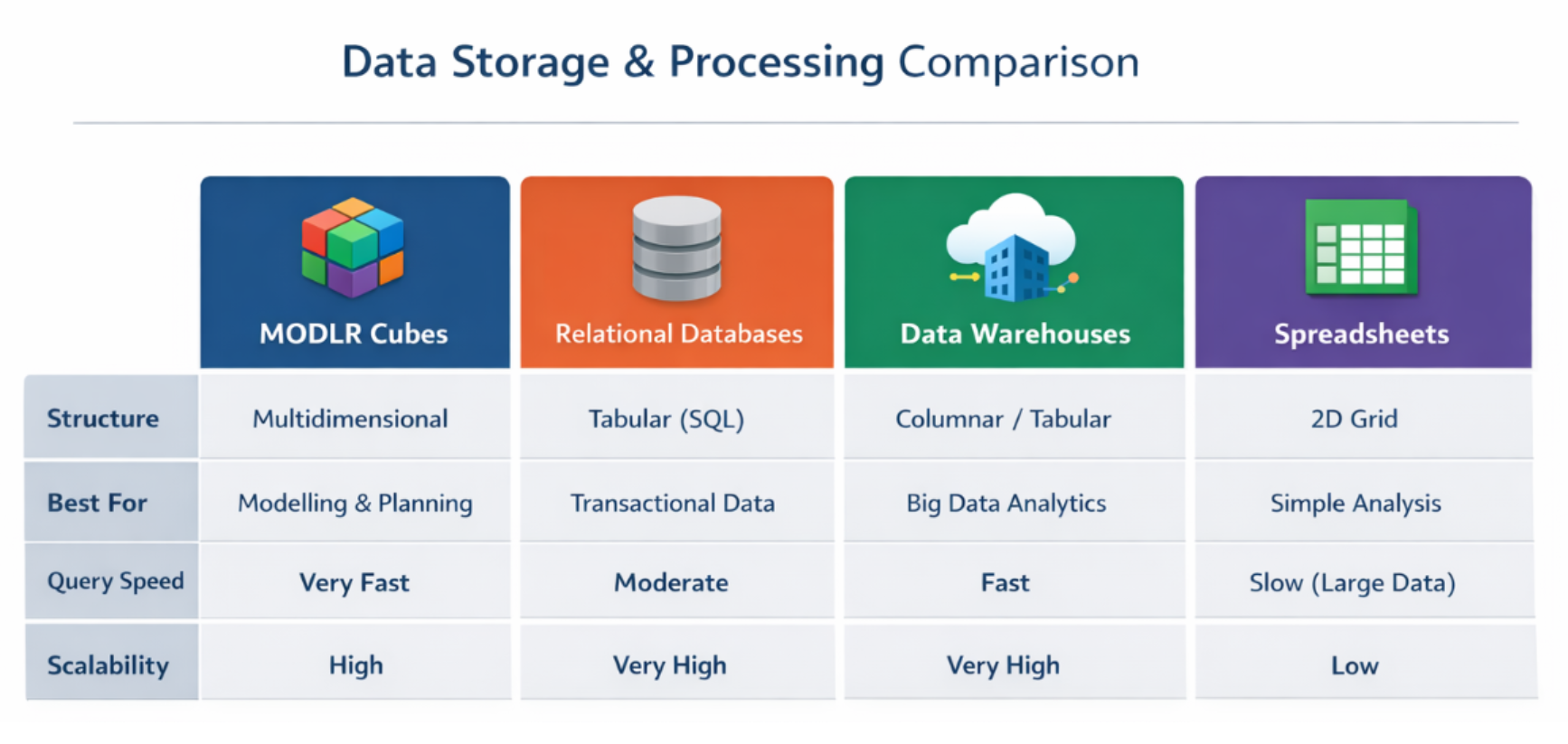
One thing to note about cubes over other data structures is that MODLR cubes are held in the memory of the server. Memory storage in any computer is ~80x faster than disk based storage, this makes cubes inherently much faster than other platforms. Here's a comparison of how MODLR cubes store and process data compared to other common data storage approaches such as Relational Databases, Date Warehouse and Spreadsheets.
What we compared:
- How each type is structured
- Their query speed
- What they are best for - such as modelling, planning, transactions, analytics, business intelligence (BI) or simple analysis
- Ease of use
- Scalability, and
- How these differences impact performance
Here’s a summary of how MODLR compares with alternatives:
To summarise, MODLR cubes sit between spreadsheets and data warehouses. They offer the flexibility of spreadsheets and the structure of databases, combining them with the analytical speed of OLAP (online analytical processing) systems.
As they have been purpose-built for financial modelling and decision-making, MODLR cubes are an integral feature for business planning and modelling. In contrast, spreadsheets are suitable for simple data analysis, while relational databases are best for recording transactions and data warehouses have been built for analytics and business intelligence (BI).
Here’s a visual summary comparing MODLR cubes with alternatives:
Other systems like Microsoft SQL does have its own cubes but these are not in memory, and do not allow writing data back into the cube (they only summarize data) and so they are slower, and much less functional.
I am a MODLR User. How Can I Create Cubes on MODLR?
You can create cubes on MODLR either manually or via an automated process.
- Visit our;technical documentation on how to create a manual cube
- Creating cubes via a process. You can learn about all aspects of Creating a Cube via a Process; by referring to MODLR technical documentation. It includes info on Cube Management Functions, Cube Data Functions, Function Optimisation and Cube Slice Function together with a Standard Template for loading data into a cube.
How can I learn more about MODLR, its features, functionalities and integration?
To know more about MODLR, contact us and schedule a demo session. You can also register to get a free account to test drive MODLR to see the platform and our many solutions in action. Click on links for details.
MODLR solutions by use case
MODLR solutions by industry
- Financial Services
- Logistics
- Manufacturing
- Media & Entertainment
- Mining and Resources
- Retail & FMCG
- Technology
- Venture Capital
- Construction
Don’t forget to visit and follow MODLR’s company page on LinkedIn.
You may also visit us on YouTube to see our videos on Short Guides, the Corporate Planning Model Series and a selection of user group sessions.